React - SPA 구현하기
SPA
리액트를 사용하는 이유중에 하나일 것이다. SPA란 Single Page Application의 약자로 하나의 페이지에서 운용되는 서비스라는 뜻이다. SPA가 아닌 MPA(Multi Page Application)은 새로운 페이지로 이동할 때마다 새로운 html을 받아오는 방식으로 페이지마다 html파일을 가지게 된다. 반면에 SPA는 하나의 html파일에서 페이지 이동을 구현한다.
SPA로 만들어진 웹 페이지는 동적인 요소들을 렌더링하고, 많은 변화 요소가 발생한다. 그래서 계속되는 변화에 효과적으로 대응할 수 있는 Virtual DOM 기술을 사용하는 react에서 더욱 좋은 시너지를 발생시킨다. 리액트에서 SPA를 쉽게 구현하기 위해서는 react-router-dom이라는 라이브러리를 사용하면 간편하다. Route태그와 Routes태그를 통해 어플리케이션 내부의 route를 구성하고 route에 맞는 페이지를 렌더링해준다. 그래서 훅을 만들기 전에 페이지 전환을 하는 route 함수를 직접 만들어보자!
route 구조 설계
SPA를 구현하기 위해서는 미리 경로를 설정하고 해당 경로에서 렌더링할 컴포넌트를 지정해줘야 한다.
export const routes = [
  {
    path: '/',
    element: MainPage,
    errorElement: NotFoundPage,
    children: [
      {
        path: 'dashboard',
        element: DashBoardPage,
      },
      {
        path: 'detail',
        children: [
          {
            path: ':id',
            element: DetailPage,
          },
        ],
      },
    ],
  },
];
나는 routes를 트리 구조로 작성했다. 실제로 react-router-dom도 트리 구조로 routes를 구성한다.
// react-router-dom 사용 예시
<BrowserRouter>
  <Routes>
    <Route path="/" element={<MainPage />}>
      <Route path="dashboard" element={<DashBoardPage />} />
      <Route path="detail">
        <Route path=":id" element={<DetailPage />} />
      </Route>
    </Route>
    <Route path="*" element={<NotFoundPage />} />
  </Routes>
</BrowserRouter>
이렇게 Routes태그와 route태그를 사용해서 표현이 가능하다. 그것을 우리는 코드로 직접 만든것이다. 간단하게 경로를 확인해보면 메인 경로인 /, 대시보드 경로인 dashboard, 상세 페이지 경로의 하위에는 동적 경로를 추가해서 넣어둔 것이다.
구현하기
이제 주소가 변경되면 해당 주소에 맞는 컴포넌트를 렌더링해주는 router함수를 만들어보겠다. 우선 router의 기능을 두가지로 구분해보겠다.
- history : 컴포넌트에서 push, back, replace와 같은 동작을 처리하는 기능
- router : main페이지에서 routes를 등록하고 SPA 기능와 이벤트 추가
생각보다 기능이 엄청나진 않다. 하지만 과정을 그러하지 않기에 한 단계씩 나아가보겠다.
router 로직 구현
loadRouteComponent
router 기능을 구현하기 위해서 가장 중요한 함수이다. 바로 현재 path를 기준으로 routes에 매칭되는 경로가 있는지 찾아 컴포넌트를 반환해주는 함수이다.
  const loadRouteComponent = (path: string) => {
    // 현재 경로 받아서 로드하는 함수
    const { Component, params } = matchUrlToRoute(routeInfo.routes ?? [], path); // 현재 경로를 route 트리에서 찾음
    if (!Component) {
      throw new Error('no matching component error');
    } else {
      pageParams = params;
      if (routeInfo.root) {
        while (routeInfo.root.firstChild) {
          routeInfo.root.removeChild(routeInfo.root.firstChild);
        }
        routeInfo.root.appendChild(createElement(Component()));
      } else {
        throw new Error('root element is empty');
      }
    }
  };
matchUrlToRoute함수는 현재 경로를 main에서 지정해준 routes에서 찾아 반환하는 함수이다. 자세한 로직은 밑에서 확인해보겠다. 그래서 매칭된 컴포넌트가 있다면 해당 컴포넌트를 삭제(removeChild)하고 다시 생성하는 과정을 거친다.
현재는 Virtual DOM을 통해 변경이 일어난 부분만 업데이트 하지 않고 새로 만들고 있다. SPA를 구현하는 것에 포커스를 두고 재조정자는 다음 포스트에서 만들어보겠다.
matchUrlToRoute
위에서 얘기했듯이 path에 맞는 컴포넌트를 찾는 역할이다.
export const pathToRegex = (path: string) => {
  return new RegExp('^' + path.replace(/:\w+/g, '(.+)') + '$');
};
  const matchUrlToRoute = (routes: Route[], path: string) => {
    //1. "/category/apple" => ['/', 'category', 'apple']` 이런 형태의 segements를 얻는다.
    const segments = path.split('/').map((segment) => {
      if (segment === '') return '/';
      return segment;
    });

    if (segments.length <= 2 && segments[1] === '/') {
      return { Component: routes[0].element, params: undefined }; // @/routes/index.ts에 있는 기본 route element 요소 리턴(main페이지)
    }
    //2. children이 없고 segments가 하나만 남았을때까지 재귀적으로 도는 함수
    function traverse(
      routes: Route[],
      segments: string[],
      errorComponent?: Component
    ) {
      //3. routes를 순회함
      for (const route of routes) {
        const { path, children, element, errorElement } = route;
        //4. pathToRegex함수를통해 path를 정규식 형태로 만들어준다.
        const regex = pathToRegex(path);
        //5. segments의 첫 번째 index가 regex랑 매칭이 되는지 확인합니다.
        const [pathname, params] = segments[0].match(regex) || [];
        //6. 매칭이 된게 없으면 넘어갑니다.
        if (!pathname) continue;
        console.log(segments);
        //7. segments의 길이가 1인 경우엔 더이상 탐색할게 없으므로 매칭된 component를 반환한다.
        if (segments.length === 1) {
          return { Component: element, params };
        } else if (children) {
          //8. children이 있을 경우 재귀적으로 traverse를 호출한다.
          return traverse(
            children,
            segments.slice(1),
            errorElement ?? errorComponent
          );
        }
      }
      //9. 매칭된게 없을 경우 errorComopnent반환
      return { Component: errorComponent, params: undefined };
    }
    return traverse(routes, segments);
  };
상당히 과정이 많지만 차례대로 읽어보면 어렵지 않다.
- 전달받은 path를 분리해서 각 segment를 얻음, 만약
/일때는 routes[0]으로 지정한 컴포넌트 리턴- children이 없고 segment가 하나만 남았을때까지 반복 함수 실행
- 매칭된 path가 있으면 해당 path에 지정한 component 리턴, 만약 segment의 길이가 1 이상이고 하위 path인 children이 존재한다면 다시 반복 함수를 실행해 children의 컴포넌트 리턴
- 모든 routes를 순회했으나 없을때에는 error컴포넌트 리턴
막상 정리해보니 더 복잡한 기분이 들지만 핵심적인 기능은 우리가 처음 지정한 routes를 순회하면서 일치하는 path를 찾는 다는 것이다.
조립하기
이제 router함수를 만들기 위한 핵심 로직은 위에서 구현되었다. 이제 중요한 것으로 router를 이동할때 a태그를 이용하게 되는데 a태그를 사용하면 새로운 브라우저 창이 열리면서 실행된다. 그래서 a태그의 기본 기능을 방지하고 history를 업데이트 시켜주면 된다.
  const router = (root: HTMLElement, routes: Route[]) => {
    routeInfo.root = root;
    routeInfo.routes = routes;

    const customizeAnchorBehavior = () => {
      // a태그 기본 이동 기능 방지
      window.addEventListener('click', (e) => {
        const el = e.target as HTMLElement; // 클릭 이벤트가 발생한 element
        const anchor = el.closest('a[data-link]'); // 클릭한 요소에서 가장 가까운 a 태그 중에서 data-link라는 데이터 속성을 가진 요소
        if (!(anchor instanceof HTMLAnchorElement)) return; // a 태그 아니면 리턴
        if (!anchor) return; // 없어도 리턴
        e.preventDefault(); // 클릭한 요소가 a태그와 가까울때 기본 기능인 route이동 기능 방지
        history.push(anchor.pathname + anchor.search); // 브라우저 히스토리 추가
      });
    };

    const initLoad = () => {
      loadRouteComponent(history.currentPath());
      customizeAnchorBehavior();

      window.addEventListener('popstate', () => {
        loadRouteComponent(history.currentPath());
      });
    };

    initLoad();
  };
아직 history 로직은 설명하기 전이지만 path를 가져오는 용도라고 이해하면 된다. 전체적으로 코드는 많지만 요약하자면 클릭이 일어난 요소에서 가장 가까운 a태그를 찾고, a태그의 기본 기능을 e.preventDefault를 통해 방지하는 것이다.
history 로직 구현
history는 router를 통해 이동하는 과정을 브라우저에 남겨주는 작업이다. 그래서 react-router-dom에서도 push, back과 같은 메서드를 사용하는 것과 같은 기능이라고 보면 된다.
  const history = {
    getPageParams() {
      return pageParams;
    },
    replace(path: string) {
      const { pathname, search } = new URL(window.location.origin + path);
      window.history.replaceState({}, '', pathname + search);
      loadRouteComponent(pathname);
    },
    push(path: string) {
      const { pathname, search } = new URL(window.location.origin + path);
      window.history.pushState({}, '', pathname + search);
      loadRouteComponent(pathname);
    },
    back() {
      window.history.back();
    },
    currentPath() {
      return window.location.pathname;
    },
  };
history 객체 내부에 각 기능에 맞는 메서드를 만들어준다. getPageParams를 제외한 모든 메서드에서 window.history를 다루는 만큼 브라우저와 관련된 기능이다. 여기에서도 위에서 만들었던 loadRouteComponent를 통해 경로를 받아 렌더링해주는 과정을 거친다.
전체 로직
router의 핵심 기능인 router함수와 브라우저를 다루는 history까지 완성되었으니 전체 코드를 보겠다.
import { createElement } from '../dom/client';
import { pathToRegex } from './utils';

export type Component = (props?: Record<string, any>) => any;

export type Route = {
  path: string;
  element?: Component;
  errorElement?: Component;
  children?: Route[];
};

const spaRouter = () => {
  let pageParams: any;
  const routeInfo: { root: HTMLElement | null; routes: Route[] | null } = {
    root: null,
    routes: null,
  };

  const matchUrlToRoute = (routes: Route[], path: string) => {
    //1. "/category/apple" => ['/', 'category', 'apple']` 이런 형태의 segements를 얻는다.
    const segments = path.split('/').map((segment) => {
      if (segment === '') return '/';
      return segment;
    });

    if (segments.length <= 2 && segments[1] === '/') {
      return { Component: routes[0].element, params: undefined }; // @/routes/index.ts에 있는 기본 route element 요소 리턴(main페이지)
    }
    //2. children이 없고 segments가 하나만 남았을때까지 재귀적으로 도는 함수
    function traverse(
      routes: Route[],
      segments: string[],
      errorComponent?: Component
    ) {
      //3. routes를 순회함
      for (const route of routes) {
        const { path, children, element, errorElement } = route;
        //4. pathToRegex함수를통해 path를 정규식 형태로 만들어준다.
        const regex = pathToRegex(path);
        //5. segments의 첫 번째 index가 regex랑 매칭이 되는지 확인합니다.
        const [pathname, params] = segments[0].match(regex) || [];
        //6. 매칭이 된게 없으면 넘어갑니다.
        if (!pathname) continue;
        console.log(segments);
        //7. segments의 길이가 1인 경우엔 더이상 탐색할게 없으므로 매칭된 component를 반환한다.
        if (segments.length === 1) {
          return { Component: element, params };
        } else if (children) {
          //8. children이 있을 경우 재귀적으로 traverse를 호출한다.
          return traverse(
            children,
            segments.slice(1),
            errorElement ?? errorComponent
          );
        }
      }
      //9. 매칭된게 없을 경우 errorComopnent반환
      return { Component: errorComponent, params: undefined };
    }
    return traverse(routes, segments);
  };

  const loadRouteComponent = (path: string) => {
    // 현재 경로 받아서 로드하는 함수
    const { Component, params } = matchUrlToRoute(routeInfo.routes ?? [], path); // 현재 경로를 route 트리에서 찾음
    if (!Component) {
      throw new Error('no matching component error');
    } else {
      pageParams = params;
      if (routeInfo.root) {
        while (routeInfo.root.firstChild) {
          routeInfo.root.removeChild(routeInfo.root.firstChild);
        }
        routeInfo.root.appendChild(createElement(Component()));
      } else {
        throw new Error('root element is empty');
      }
    }
  };

  const history = {
    getPageParams() {
      return pageParams;
    },
    replace(path: string) {
      const { pathname, search } = new URL(window.location.origin + path);
      window.history.replaceState({}, '', pathname + search);
      loadRouteComponent(pathname);
    },
    push(path: string) {
      const { pathname, search } = new URL(window.location.origin + path);
      window.history.pushState({}, '', pathname + search);
      loadRouteComponent(pathname);
    },
    back() {
      window.history.back();
    },
    currentPath() {
      return window.location.pathname;
    },
  };
  const router = (root: HTMLElement, routes: Route[]) => {
    routeInfo.root = root;
    routeInfo.routes = routes;

    const customizeAnchorBehavior = () => {
      // a태그 기본 이동 기능 방지
      window.addEventListener('click', (e) => {
        const el = e.target as HTMLElement; // 클릭 이벤트가 발생한 element
        const anchor = el.closest('a[data-link]'); // 클릭한 요소에서 가장 가까운 a 태그 중에서 data-link라는 데이터 속성을 가진 요소
        if (!(anchor instanceof HTMLAnchorElement)) return; // a 태그 아니면 리턴
        if (!anchor) return; // 없어도 리턴
        e.preventDefault(); // 클릭한 요소가 a태그와 가까울때 기본 기능인 route이동 기능 방지
        history.push(anchor.pathname + anchor.search); // 브라우저 히스토리 추가
      });
    };

    const initLoad = () => {
      loadRouteComponent(history.currentPath());
      customizeAnchorBehavior();

      window.addEventListener('popstate', () => {
        loadRouteComponent(history.currentPath());
      });
    };

    initLoad();
  };
  return { history, router };
};

export const { history, router } = spaRouter();
엄청 긴 코드이지만 요약하면 현재 경로를 받아 맞는 컴포넌트를 렌더링하고, 경로에 대한 정보를 브라우저에도 남겨주는 함수이다. 지금까지는 두개를 별도로 설명하느라 빠진 부분도 있을텐데 이렇게 전체를 보면 조금더 흐름이 이해가 될것이다.
import { router } from './lib/router';
import { routes } from './routes';

const app = document.getElementById('app') as HTMLElement;
router(app, routes);
이제 실제로 적용해보자! 간단하게 위에서 지정한 route를 기준으로 컴포넌트를 만들어보겠다.
// 기본 '/' 페이지 const MainPage = () => { return ( <div> <h2>MainPage</h2> <a data-link href='/dashboard'> go DashBoard </a> <a data-link href='/detail/1'> go Detail </a> </div> ); }; // '/dashboard' 페이지 const DashBoardPage = () => { return ( <div> <h2>DashBoard</h2> <a data-link href='/'> go Main </a> <a data-link href='/detail/1'> go Detail </a> </div> ); }; // '/detail/:id' 페이지 const DetailPage = () => { const params = history.getPageParams(); const page = Number(params); return ( <div> <h2>Detail {params}</h2> <a data-link href='/'> go Main </a> <a data-link href='/dashboard'> go DashBoard </a> <a data-link href={`/detail/${page + 1}`}> go Detail {page + 1} </a> </div> ); };
간단하게 a태그를 클릭하면 해당 경로에 지정한 컴포넌트가 렌더링되는 간단한 컴포넌트이다. 컴포넌트만 지정할 것이 아니라 main.tsx파일에서 우리가 만든 router를 적용시켜줘야 경로에 맞는 route가 렌더링된다.
import { router } from './lib/router';
import { routes } from './routes';

const app = document.getElementById('app') as HTMLElement;
router(app, routes);
처음 실행하게 되면 아무런 경로가 없기 때문에 메인페이지가 렌더링된다.
 이후에 a태그로 지정한 router 버튼을 클릭하면 해당 경로로 이동하게 된다.
 단순히 새로운 페이지를 다시 렌더링 하는 것이 아니라 하나의 html파일에서 태그만 변경하는 과정이 이뤄지는 것이다. 물론 지금은 재조정자가 구현이 안되어 있어서 app 태그 내부의 모든 자식 태그가 변경된다. 하지만 html은 한개이다. 이제 동적 경로인 detail경로로 접근해보겠다.
 대시보드 페이지에서
 /detail/1로 이동했기 때문에 history의 getPageParams를 받아서 1이라는 숫자가 제목으로 들어간 것이다. 그리고 현재 Params를 숫자로 변환해 1을 더해주어 다음 페이지인 2페이지로 이동하도록 구현해주었다.
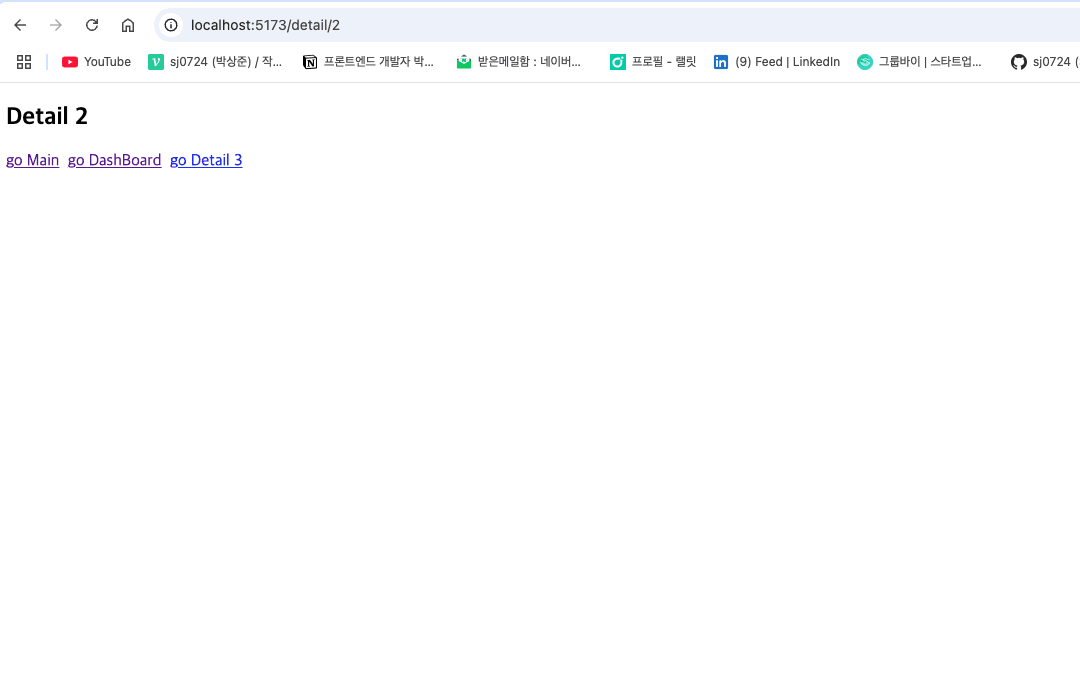
우리가 구현하고자 했던 SPA는 구현이 되었다. 페이지가 이동할때마다 새로운 html파일을 받지 않고 한개의 html파일만 다루고 있기 때문이다. 하지만 지금 단계는 모든 태그를 갈아치우기 때문에 최적화는 안되어 있는 반쪽짜리 SPA일 뿐이다.
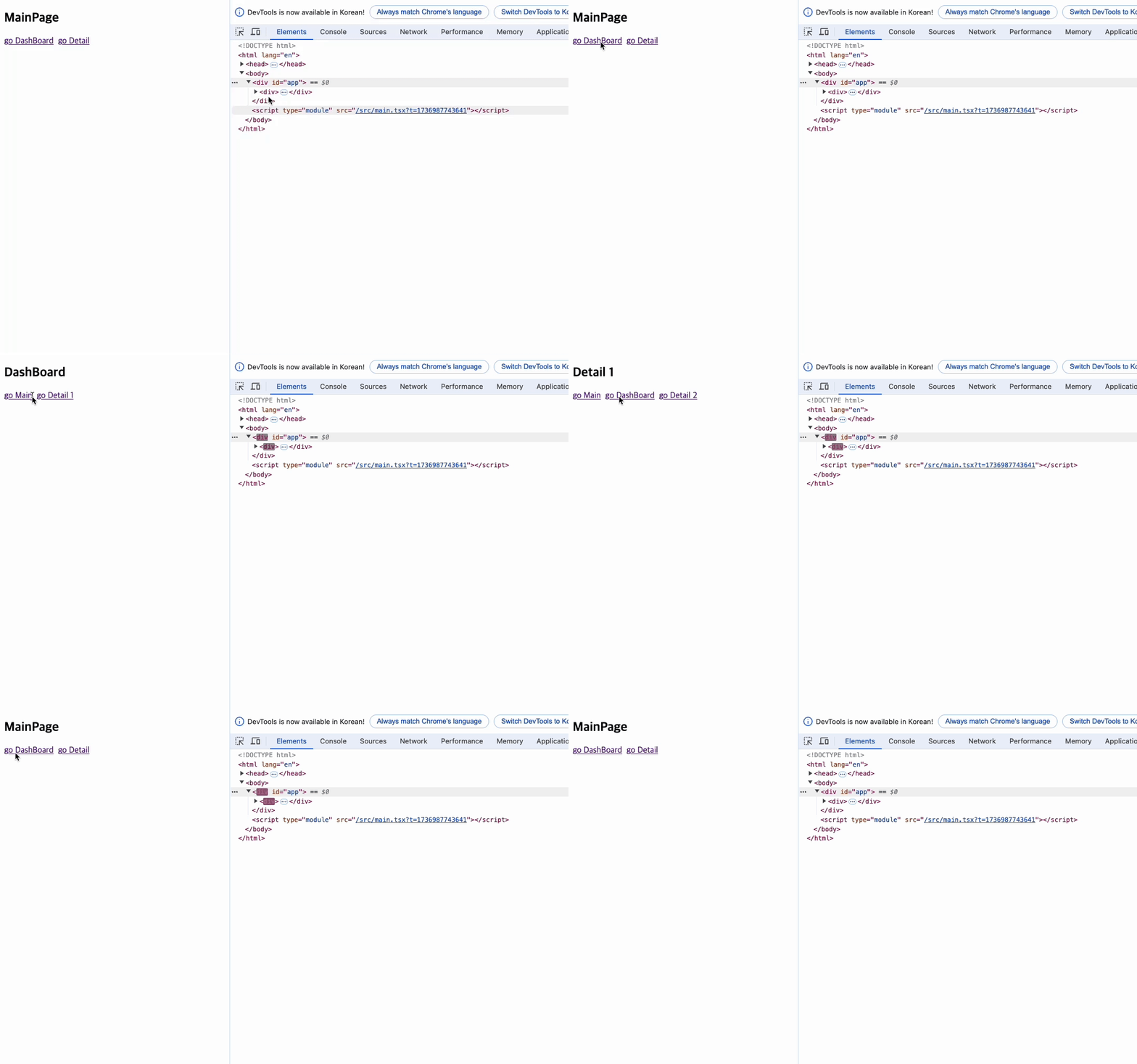
지금 컴포넌트상에서는 동일한 위치에 동일한 태그를 가진 요소들이 존재한다. 만약 react의 reconcilator를 구현한다면 변경이 이뤄진 부분만 렌더링하는 동작 구현이 가능할 것이다. 그리고 이렇게 만들어진 reconcilator는 useState와 같은 상태 관리에도 사용될 예정이다.
마무리
내가 사용하던 라이브러리가 이런 원리로 동작된다는 사실을 처음 알았다. 뭔가 복잡하면서 간단한 느낌이랄까... 원리는 간단한데 구현 과정이 간단하지 않다는 생각이 든다. 오늘도 나의 실력 부재를 뼈저리게 느낀다. 나도 언젠간 이런 걸 만들수 있을까 기대가 되기도 하고 할수 있을까 싶은 우려도 있다. 걱정하기전에 실력부터 키우자!
다음에는 reconcilator를 만들어보겠다. 그러면 완벽한 SPA가 구현될 것이다.
개의 댓글
1
SPA
route 구조 설계
구현하기
router 로직 구현
loadRouteComponent
matchUrlToRoute
조립하기
history 로직 구현
전체 로직
마무리