React - reconciliation 구현하기
reconciliation이게 뭔데?
리액트 재조정이다. 리액트는 변동사항이 생기면 완전히 새로운 DOM을 만드는 것이 아니라 Virtual DOM을 통해 변동이 일어난 부분만 변경해 DOM에 적용시킨다. 그래서 SPA를 위해서 변동사항만 업데이트하는 과정을 반드시 구현해야 한다.
엄청 복잡하고 어려운 로직은 아니다. 기존에 생성한 Virtual DOM을 기반으로 변동이 일어난 부분을 새롭게 생성하는 것이 아니라 변경시켜주는 것이다. 저번에 작성한 코드중에 문제가 있던 부분을 다시 보겠다.
  const loadRouteComponent = (path: string) => {
    // 현재 경로 받아서 로드하는 함수
    const { Component, params } = matchUrlToRoute(routeInfo.routes ?? [], path); // 현재 경로를 route 트리에서 찾음
    if (!Component) {
      throw new Error('no matching component error');
    } else {
      pageParams = params;
      if (routeInfo.root) {
        while (routeInfo.root.firstChild) {
          routeInfo.root.removeChild(routeInfo.root.firstChild); // 노드 삭제
        }
        routeInfo.root.appendChild(createElement(Component())); // 노드 생성
      } else {
        throw new Error('root element is empty');
      }
    }
  };
이 로직에서 문제는 routeInfo의 모든 자식 노드를 삭제하고 다시 새로운 노드를 생성하는 과정을 가졌다. 그래서 발생한 문제로
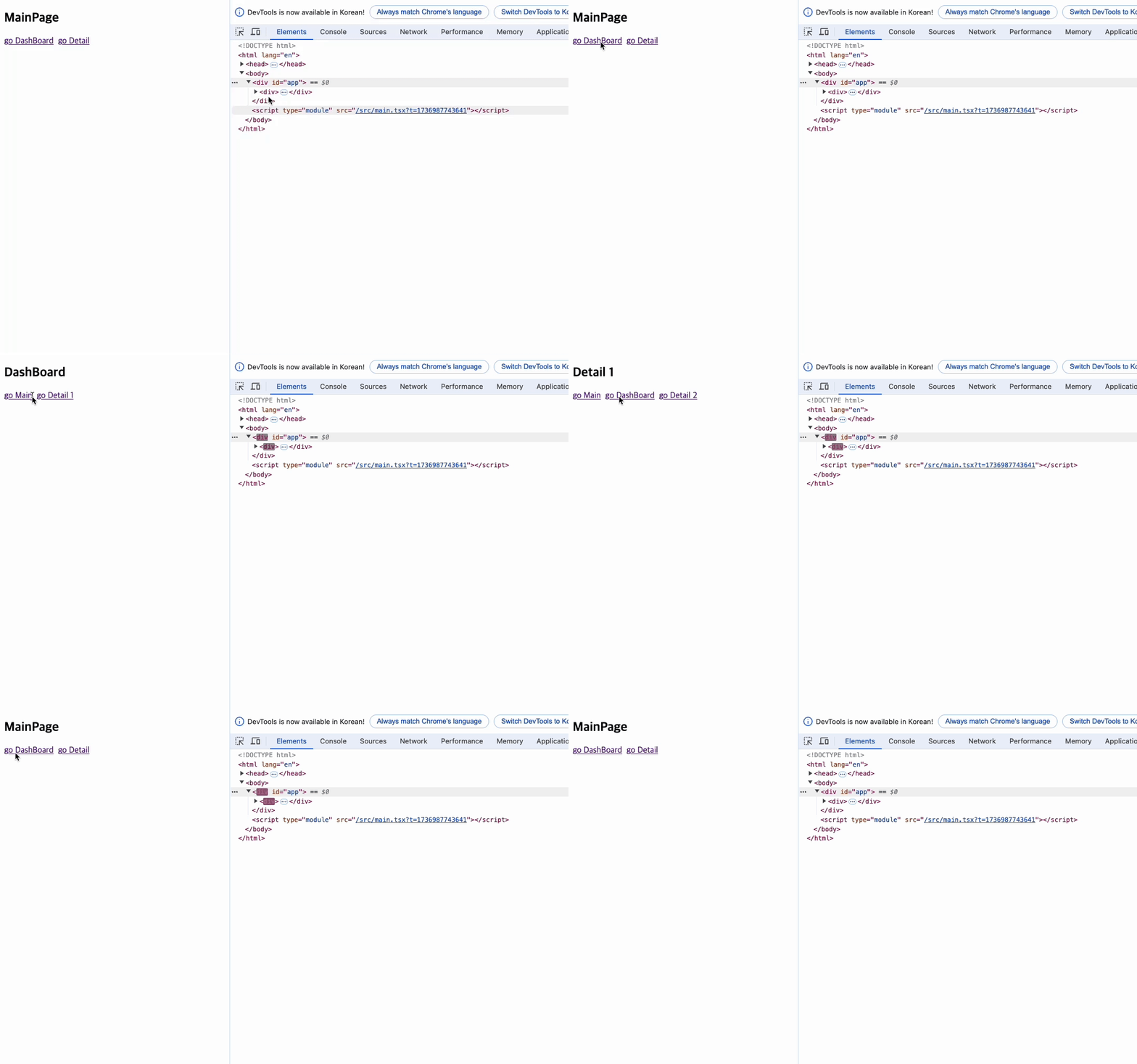 router를 이동할때마다 app 컴포넌트 전체가 바뀌는 문제가 발생했다. 물론 app 컴포넌트 내부에 존재하는 컴포넌트는 변경되지만 app컴포넌트 자체는 변화가 없기 때문에 업데이트하는 방식이 올바르다. 그래서 재조정을 구현하려고 하는 것이고, 이렇게 만들어진 재조정 로직은 state를 업데이트하는 곳에서도 사용되기 때문에 반드시 필요하다.
reconcilation 구현하기
재조정과정을 구현하기 전에 어떤 기능들이 있어야할지 고민해보겠다. 우선 우리가 바꿀수 있는 것은 태그 type, attributes, text이다.
updateAttributes
function updateAttributes(
  target: Element,
  newProps: Record<string, any>,
  oldProps: Record<string, any>
) {
  for (const [attr, value] of Object.entries(newProps)) {
    if (oldProps[attr] === newProps[attr]) continue;
    (target as any)[attr] = value;
  }

  for (const attr of Object.keys(oldProps)) {
    if (newProps[attr] !== undefined) continue;
    if (attr.startsWith('on')) {
      (target as any)[attr] = null;
    } else if (attr.startsWith('class')) {
      target.removeAttribute('class');
    } else {
      target.removeAttribute(attr);
    }
  }
}
가장 먼저 만든 기능은 태그의 attributes, 즉 속성이다. 속성을 변경할 요소를 target으로 받아서 새로운 요소인 newProps와 기존 요소인 oldProps를 활용해 새로운 속성을 생성하고 필요없는 속성은 삭제해주는 로직이다. 이렇게 해주면 기존 태그와 새롭게 변경할 태그의 속성을 가져와서 업데이트 시켜준다.
여기에서 props는 컴포넌트에 있는 태그의 속성을
Record<string, any>으로 변환한 것을 의미한다.
diffTextVDOM
태그 내부의 텍스트를 변환시키는 방법이다. 텍스트가 변경되면 당연히 변경이 필요하지만, 같은 내용이여도 타입이 다르면 다르게 표시해줘야 한다.
const diffTextVDOM = (newVDOM: VNode, currentVDOM: VNode) => {
  if (typeof newVDOM !== typeof currentVDOM) {
    return true; // 타입이 다르면 무조건 다름
  }

  if (typeof newVDOM === 'string' || typeof newVDOM === 'number') {
    return newVDOM !== currentVDOM; // 값이 다를 때만 true
  }

  return false; // 기본적으로 같다고 가정
};
그래서 요소의 타입과 내용을 확인해서 다른 태그인지 여부를 확인해주는 로직이다. 여기에서 true가 나온다면 기존 요소를 새로운 요소로 바꿔준다.
updateElement
이제 태그 자체 검사를 포함해서 위에 작성한 attributes, text를 전부 비교해주는 로직을 작성해주겠다.
const updateElement = (
  parent: Element,
  newVDOM?: VNode | null,
  currentVDOM?: VNode | null,
  index: number = 0
) => {
  let removeIndex: undefined | number = undefined;

  const hasOnlyCurrentVDOM =
    newVDOM === null ||
    (newVDOM === undefined &&
      currentVDOM !== null &&
      currentVDOM !== undefined);

  const hasOnlyNewVDOM =
    newVDOM !== null &&
    newVDOM !== undefined &&
    (currentVDOM === null || currentVDOM === undefined);

  //1.
  if (parent.childNodes) {
    if (hasOnlyCurrentVDOM) {
      parent.removeChild(parent.childNodes[index]);
      return index;
    }
  }

  //2.
  if (hasOnlyNewVDOM) {
    parent.appendChild(createElement(newVDOM));
    return;
  }

  //3.
  if (diffTextVDOM(newVDOM, currentVDOM)) {
    parent.replaceChild(createElement(newVDOM), parent.childNodes[index]);
    return;
  }

  if (typeof newVDOM === 'number' || typeof newVDOM === 'string') return;
  if (typeof currentVDOM === 'number' || typeof currentVDOM === 'string')
    return;
  if (!newVDOM || !currentVDOM) return;

  //4.
  if (newVDOM.type !== currentVDOM.type) {
    parent.replaceChild(createElement(newVDOM), parent.childNodes[index]);
    return;
  }

  //5.
  updateAttributes(
    parent.childNodes[index] as Element,
    newVDOM.props ?? {},
    currentVDOM.props ?? {}
  );

  //6.
  const maxLength = Math.max(
    newVDOM.children.length,
    currentVDOM.children.length
  );
  for (let i = 0; i < maxLength; i++) {
    const _removeIndex = updateElement(
      parent.childNodes[index] as Element,
      newVDOM.children[i],
      currentVDOM.children[i],
      removeIndex ?? i
    );
    removeIndex = _removeIndex;
  }
};
로직의 길이가 길기 때문에 하나씩 나눠서 설명해보겠다.
- 1 ) parent의 자식 노드가 있고, hasOnlyCurrentVDOM(currentVDOM만 있는 경우)이 true 경우에 현재 DOM을 삭제한다.
- 2 ) hasOnlyNewVDOM(newVDOM만 있는 경우)이 true인 경우 newVDOM을 추가한다.
- 3 ) newVDOM과 currentVDOM의 텍스트를 비교한 결과 다를 경우 새로운 요소로 변경한다.
- 4 ) newVDOM과 currentVDOM의 타입이 다를 경우 새로운 요소로 변경한다.
- 5 ) newVDOM의 attributes로 업데이트 해준다.
- 6 ) DOM에 존재하는 자식 노드(children)도 재귀함수를 통해 전부 updateElement를 진행해준다.
render
이제 업데이트된 요소를 렌더링하는 로직을 별도로 작성해줘야 한다. 지금은 단순히 업데이트만 하는 과정이기 때문에 브라우저에 적용되지 않는다.
interface IRenderInfo {
  $root: HTMLElement | null;
  component: null | Component;
  currentVDOM: VDOM | null;
}

const domRenderer = () => {
  const renderInfo: IRenderInfo = {
    $root: null,
    component: null,
    currentVDOM: null,
  };

  const _render = () => {
    const { $root, currentVDOM, component } = renderInfo;
    if (!$root || !component) return;

    const newVDOM = component();
    updateElement($root, newVDOM, currentVDOM);
    renderInfo.currentVDOM = newVDOM;
  };

  const render = (root: HTMLElement, component: Component) => {
    renderInfo.$root = root;
    renderInfo.component = component;
    _render();
  };

  return { render };
};
로직의 원리는 간단하다. 기준이 되는 root Element와 component를 renderInfo에 저장해두고, _render함수를 실행한다. _render함수는 렌더링할 컴포넌트를 가져와 newVDOM으로 변환하고, 변환한 newVDOM을 위에서 만들어준 updateElement를 사용해서 현재 DOM에 적용시켜주는 것이다. 그 이후에는 renderInfo의 currentVDOM을 변경함으로서 Virtual DOM도 최신화를 시켜주는 것이다.
import { router } from './lib/router';
import { routes } from './routes';

const app = document.getElementById('app') as HTMLElement;
router(app, routes);
이제 실제로 이렇게 적용하면 된다. 그러면 app컴포넌트는 root컴포넌트가 되고, routes에 저장해둔 path, component, children 정보를 가지고 렌더링 및 업데이트를 실행하는 것이다.
렌더링 로직 수정하기
이제 위에서 문제가 있었던 loadRouteComponent 함수를 수정해보겠다.
  const loadRouteComponent = (path: string) => {
    // 현재 경로 받아서 로드하는 함수
    const { Component, params } = matchUrlToRoute(routeInfo.routes ?? [], path); // 현재 경로를 route 트리에서 찾음
    if (!Component) {
      throw new Error('no matching component error');
    } else {
      pageParams = params;
      if (routeInfo.root) {
        render(routeInfo.root, Component);
      } else {
        throw new Error('root element is empty');
      }
    }
  };
기존의 모든 노드를 삭제하고 DOM을 다시 만드는 로직이 아닌 render함수를 통해 변경이 일어난 노드만 변경하는 것이다.
업데이트 직접 확인하기
이제 실제로 잘 되는지 확인해보겠다. 전 동작은 동일한 노드가 존재해도 페이지가 이동할때마다 DOM을 새로 만들기 때문에 모든 노드가 생성되었다. 하지만 이제는 변경이 일어난 노드만 새롭게 생성되는 동작이 될것이다.
 우선 전에는 app 컴포넌트가 전부 새롭게 생성되는데 반해 지금은 app 컴포넌트는 그대로, 내부에 있는 자식 노드들만 변경이 일어나고 있다. 추가적으로 메인 페이지를 제외한 다른 페이지에서는 메인으로 이동하는 버튼이 공통적으로 들어있는 상황이다. 메인으로 이동하는 링크는 매번 똑같은 경로와 텍스트를 가지고 있기 때문에 이동해도 새롭게 렌더링 되지 않고 유지되는 것을 볼수가 있다.
마무리
생각보다 꽤 긴 코드가 나왔다. 부모 노드와 자식 노드, root 경로와 children 경로 등 많은 관계로 얽힌 코드를 이해하는데에 상당한 노력이 들어갔다. 안타깝게도 내가 전부 작성하지는 못했지만 내가 원하는 결과가 나와서 다행이다. 이제 리액트의 SPA와 재조정까지 완성되었다. 사실상 리액트 상태 관리는 재조정 기능을 활용하는 방법이기 때문에 사실상 핵심 로직은 구현이 되었다고 보면 된다.
나는 리액트를 사용해서 많은 시간 코드를 작성해봤다. 리액트의 개념을 이해하고 받아들이는데에도 많은 시간과 노력이 들어갔고 나름 잘 이해하고 사용하고 있다고 생각했다. 하지만 이렇게 순수 자바스크립트로 리액트를 따라해보며 많은 부족함을 느낀다. 반면에 간편하게 DOM을 조작하고 다룰수 있게 만들어준 리액트팀에게도 감사하다... 항상 부족함을 인지하고 성장해야겠다는 생각이 많이 든다. 조금씩 더 열심내보자.
개의 댓글
1
reconciliation이게 뭔데?
reconcilation 구현하기
updateAttributes
diffTextVDOM
updateElement
render
렌더링 로직 수정하기
업데이트 직접 확인하기
마무리